facebook feed ad maker

Facebook feed ads that show the product, the proof and the price

The Facebook feed is where most small brands spend first, and a feed ad gets about a second to say what you sell, why it is good and what it costs. StoreToAds builds that ad from your product page, in 4:5 and square.

Launching soon. Early access opens in small batches; we'll email you first.

Feed shapes on Facebook

ShapeSize we deliverNotes
4:5 vertical1080 x 1350Meta's recommended ratio for Facebook Feed images; the most height on a phone
1:1 square1080 x 1080Matches Meta's recommended minimum for square feed images
1.91:1 landscape1200 x 628Accepted in the feed but takes the least height; we make it mainly for Google
Meta Ads Guide and Business Help Center, October 2026.

Meta's help center currently lists 1440 x 1800 as the recommended minimum for 4:5 images in Facebook Feed. StoreToAds delivers 4:5 at 1080 x 1350, the long-standing feed size that Meta accepts.

What a feed ad needs to carry

Feed shoppers compare. The ads that do well for small stores tend to give them three things they can take in at a glance: the product, one reason to buy it, and either a price or proof.

  • Show the price when it helps. A real price, or a real sale price with the old one struck through, answers the first question before the click.
  • Use proof you actually have: your star rating, your review count, a customer's exact words.
  • Keep the words on the image short. The primary text above the image is the place for longer copy.
  • Test at phone size. If the headline is hard to read on your own phone, it is too small.

An example: a real sale price

Sora, one of our fictional sample brands, showed a compare-at price on its store: $34, now $29 for a 12-pack. Our engine turned that into a price-drop ad. If the store had shown no old price, there would be no price-drop ad, because we never invent a discount.
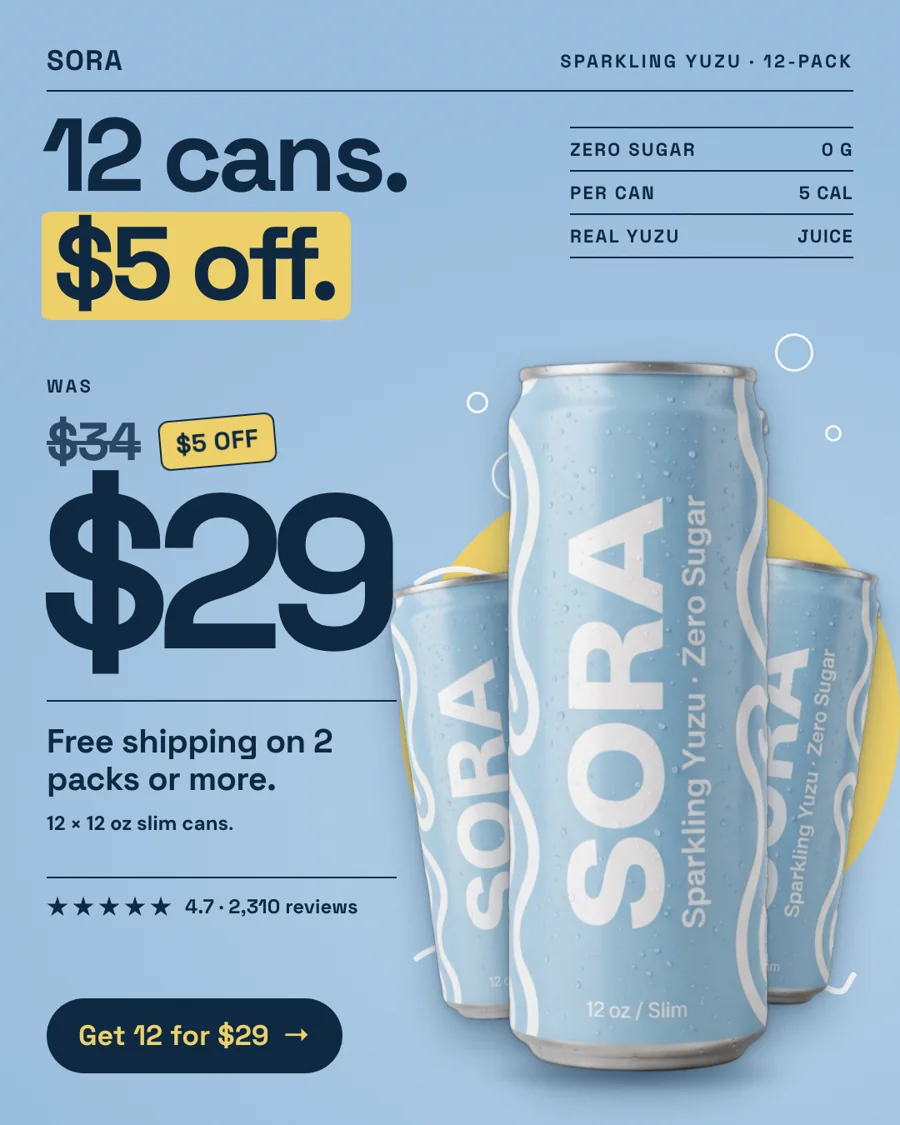

Price-drop ad for Sora Sparkling Yuzu (fictional sample brand): was $34, now $29, with the store's free-shipping offer.
Fictional samplePrice-drop ad for Sora Sparkling Yuzu (fictional sample brand): was $34, now $29, with the store's free-shipping offer.

How it works

How StoreToAds makes it

  1. 01

    Paste your store

    Any store with product pages works. Prices, sale prices, ratings and quotes are read from your pages and checked.

  2. 02

    Different reasons to buy

    Each batch covers different angles in different formats, so the ads you test in the feed are genuinely different.

  3. 03

    Send to Meta, paused

    On Growth, Pro and Scale, the 4:5 version lands in Ads Manager as a paused draft. Nothing spends until you publish it.

  4. 04

    The next batch learns

    Weekly plans read your Meta results and lean the next batch toward what sold, keeping about 30% for new ideas.

Examples

Fictional sample brands. Drag across an ad to see the store photo it was made from; our engine designed each one from that photo and the store's data.

Sample stores
The finished Sora ad: PersonalitySora Sparkling Yuzu, 12-Pack: the product photo from the store

Sora

Drinks

Sparkling Yuzu, 12-Pack

  • Price checked
  • Reviews checked
  • 5 sizes

Reason to buy: Personality

Make this for my store

Questions

Does StoreToAds publish my Facebook ads?

No. Send to Meta creates paused drafts in your ad account. You review them in Ads Manager and decide when to publish.

4:5 or square for the Facebook feed?

A 4:5 ad is a quarter taller than a square of the same width, so it is the usual pick for a single-image feed ad. The square is handy when one creative has to serve several placements.

Why is the 4:5 not 1440 x 1800?

Our ads are designed on a 1080 x 1350 canvas today. Meta accepts it and it is still the most common 4:5 size, but Meta's help center now recommends 1440 x 1800 for 4:5 in Facebook Feed.

Can I edit the ad before it goes to Meta?

Yes. Click any word to change it, or ask AI to change it, then send the edited version.






