makeup ad generator

Makeup ads that show the shade before anything else

Makeup buyers look for one thing first: will this shade work on me? StoreToAds builds ads from your product pages that name the shade and finish, use the swatch photos you already have, and quote reviews exactly as customers wrote them.

Launching soon. Early access opens in small batches; we'll email you first.

What a makeup ad has to answer

Three questions decide most makeup clicks: the shade, the finish and how long it lasts. Answer one clearly per ad rather than all three in small type.

  • Name the shade. "Rosewood, a muted mauve" tells a shopper more than a pretty product shot. If your page describes undertones, the ad can too.
  • Show range when range is the point. A foundation sold in 40 shades should say 40 in big type, using the number your page lists.
  • Keep color true. We place your photo as it is and never recolor it, so the shade in the ad matches what ships. A photo with a heavy filter carries that filter into the ad.
  • Only claim the wear time your page claims. "12-hour wear" or "transfer-proof" comes from your product copy, or it doesn't appear.

Formats that suit makeup

Swatch-led products suit an annotated layout: the product with callouts for finish, coverage and key ingredients. Cult products suit a quote wall, where several short reviews surround the compact. New shades suit a bold poster with the shade name as the headline.
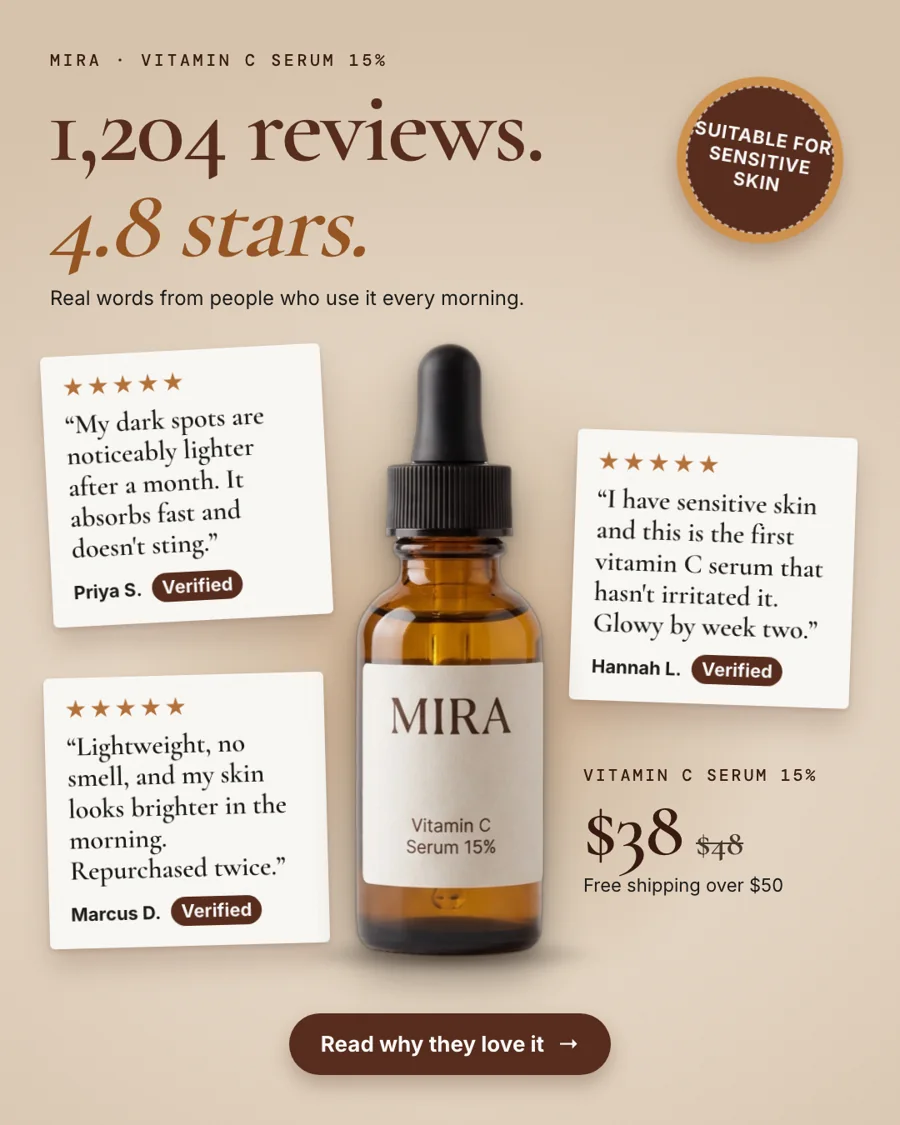
Quote wall for our fictional sample brand Mira: the rating, the review count and three verbatim reviews around the real bottle. The same layout suits a best-selling lipstick or concealer.
Fictional sampleQuote wall for our fictional sample brand Mira: the rating, the review count and three verbatim reviews around the real bottle. The same layout suits a best-selling lipstick or concealer.

If your product page shows a vegan or cruelty-free certification, it can sit in a small badge. If it doesn't, the ad won't say it.


How it works

How StoreToAds makes it

  1. 01

    Paste your store

    Shopify, WooCommerce, Wix, Squarespace, PrestaShop or any store with product pages. Screenshots work if your store blocks automatic reading.

  2. 02

    We read shades and reviews

    Shade names, finishes, prices, sale prices, ratings and quotes come from your pages, and each one is checked against its source.

  3. 03

    Brief a launch

    Choose the launch goal in Your brief and add the new shade names to Must say, so every ad in the batch features them.

  4. 04

    Edit and send

    Change any word in the browser, ask AI for a shorter headline, and on weekly plans send the ads to Meta as paused drafts.

Examples

Fictional sample brands. Drag across an ad to see the store photo it was made from; our engine designed each one from that photo and the store's data.

Sample stores
The finished Mira ad: BenefitMira Vitamin C Serum 15%: the product photo from the store

Mira

Skincare

Vitamin C Serum 15%

  • Price checked
  • Reviews checked
  • 5 sizes

Reason to buy: Benefit

Make this for my store

Questions

Can I make ads for one shade or collection?

Yes. Name it in Must say or the notes in Your brief, or add that product by hand with its own photos, and the batch is built around it.

Will you edit my swatch photos?

We cut the product out of its background and place it. We never recolor or retouch it, so shade and texture stay exactly as photographed.

What if my reviews mention skin types?

Verbatim quotes can include them ("finally a concealer that doesn't crease on dry skin"), because the customer said it. The ad won't add skin claims of its own.

Do the ads include models?

Only in your own photos. If your store has on-face images, they can lead a lifestyle ad. We never generate faces.





