before after ad generator

Before-and-after ads, done honestly

Before-and-after is one of the strongest ideas in advertising and one of the easiest to fake. StoreToAds never creates or edits an "after" image. It builds the angle from what is real: your own photos, honest comparisons and what customers say changed.

Launching soon. Early access opens in small batches; we'll email you first.

Check the platform rules first

Meta's ad policies restrict before-and-after images in health-related categories such as weight loss, and they do not allow ads that imply something about the viewer's body or health. Many skincare, haircare and supplement ads with side-by-side face or body shots get rejected. Read the policy for your category before you build the angle around a picture.

Three honest ways to show a change

  1. Real photos you own, in categories where the result is an object, not a body: a cleaned sneaker, a restored leather bag, a tidy drawer, a garden bed.
  2. Without versus with: an us-vs-them table that compares the usual option with yours, row by row.
  3. Customers' own words with a time frame, such as "My dark spots are noticeably lighter after a month", quoted exactly.
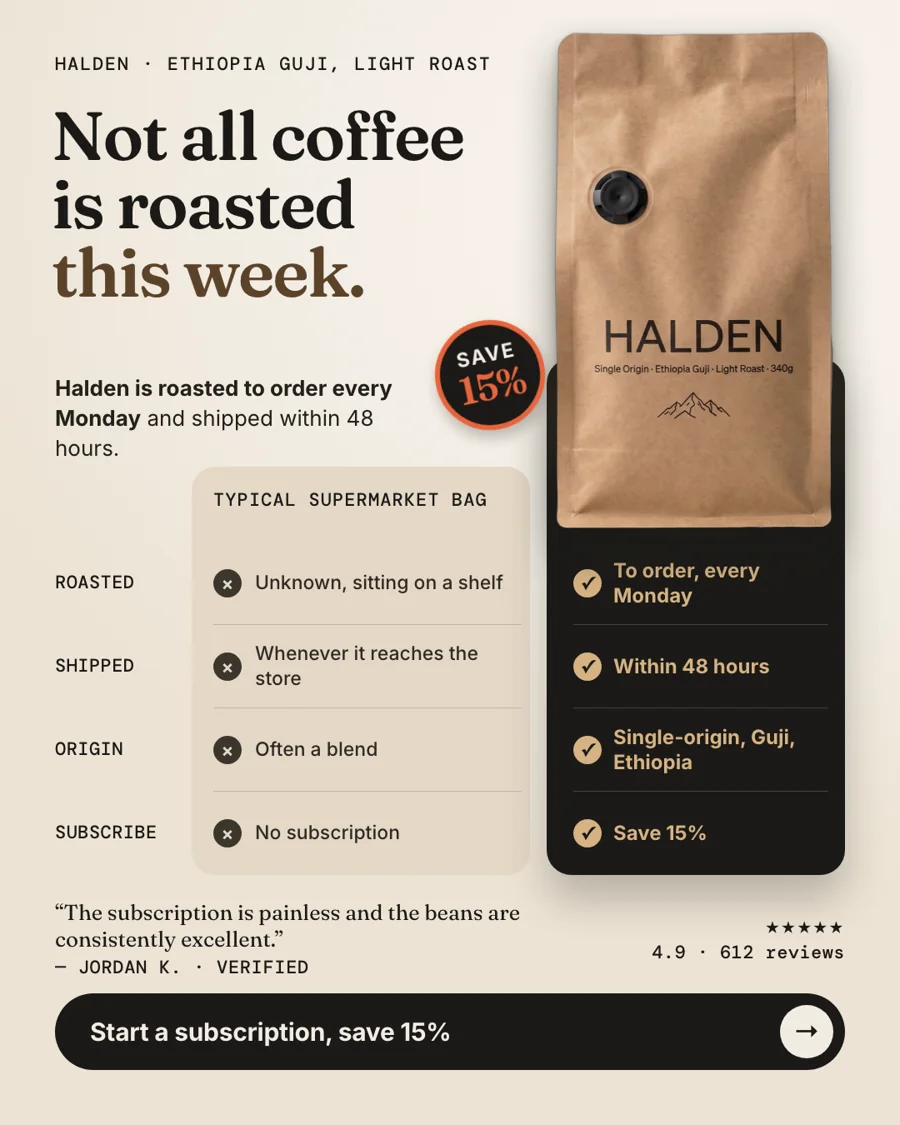
Without versus with for Halden, a fictional sample brand: a typical supermarket bag compared with coffee roasted to order every Monday and shipped within 48 hours.
Fictional sampleWithout versus with for Halden, a fictional sample brand: a typical supermarket bag compared with coffee roasted to order every Monday and shipped within 48 hours.

What not to do

  • No edited or generated "after" photos, and no lighting tricks between the two shots.
  • No implied guarantee that everyone gets the same result.
  • Time frames such as "in 4 weeks" only when your product page or a customer says it.

Honest note: if you have no real before-and-after photos, StoreToAds makes the comparison and quote versions instead. It will not stage a result.


How it works

How StoreToAds makes it

  1. 01

    Paste your store

    We read your product claims and reviews, including any time frames your customers mention.

  2. 02

    Add your real photos

    If you own genuine before-and-after photos, add them as product photos when you add a product by hand.

  3. 03

    Comparison and quote formats

    Us-vs-them tables, annotated products and review cards carry the angle without a staged image.

  4. 04

    Keep risky words out

    Add words such as "cure" or "guaranteed" to Never say in Your brief and no ad in the batch uses them.

Examples

Fictional sample brands. Drag across an ad to see the store photo it was made from; our engine designed each one from that photo and the store's data.

Sample stores
The finished Halden ad: Social proofHalden Ethiopia Guji, Light Roast: the product photo from the store

Halden

Coffee

Ethiopia Guji, Light Roast

  • Price checked
  • Reviews checked
  • 5 sizes

Reason to buy: Social proof

Make this for my store

Questions

Can StoreToAds make the after photo for me?

No. We never generate or alter a result image. That would mislead shoppers and break most ad platforms' rules.

Will Meta approve my before-and-after ad?

We cannot promise that. Approval depends on your category and the image, so check Meta's policies before you publish.

What works instead for skincare?

Ingredient callouts and customers describing their results in their own words. See our [skincare page](/industries/skincare-ad-generator) for examples.





